Help you increase activity.
- Send more messages
- Automate follow-ups
- Create sequences
- Connect your account
- Track volume
Analyze your LinkedIn outreach to understand what earns replies, recover missed follow-ups and improve manual sales prospecting—without bots, scraping or mass outreach.
Built for founders, consultants, recruiters and sales professionals who develop high-value relationships through thoughtful, personalized outreach.
Most LinkedIn tools help you send more messages.
Pactando helps you understand the messages you’ve already sent.
Because the best opportunities are often hidden in conversations you already started.
Sending more messages does not automatically create more opportunities. Pactando helps you see which conversations earned attention and which ones deserve another look.
Use your official LinkedIn export. No account connection, browser extension or scraping required.
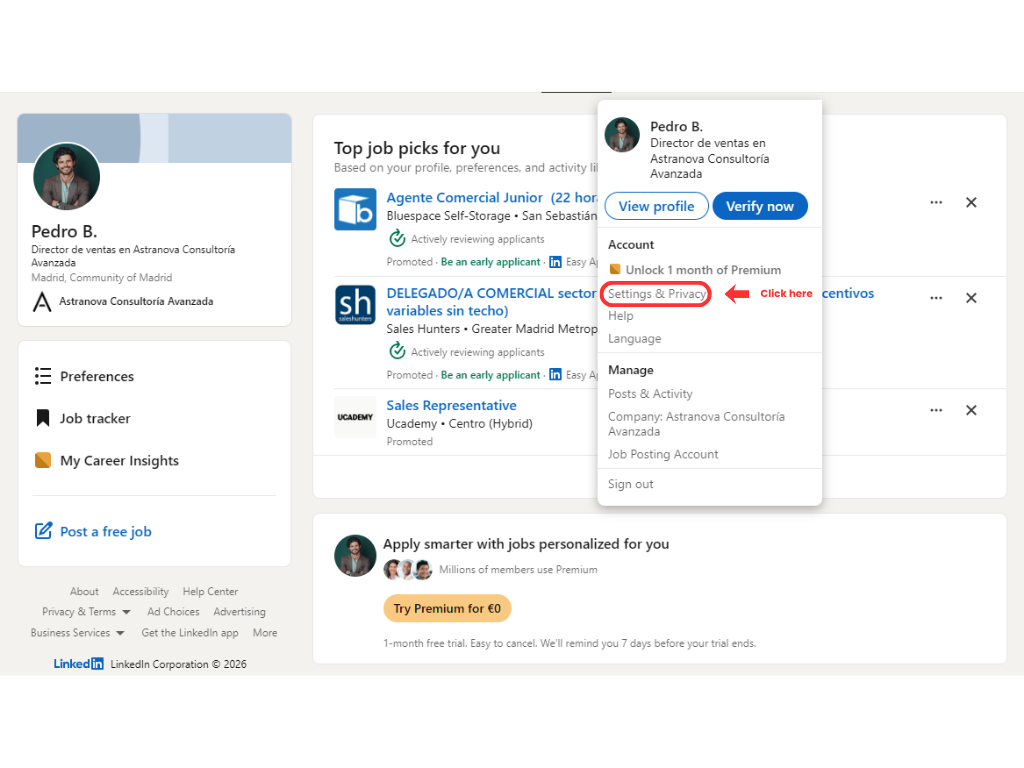
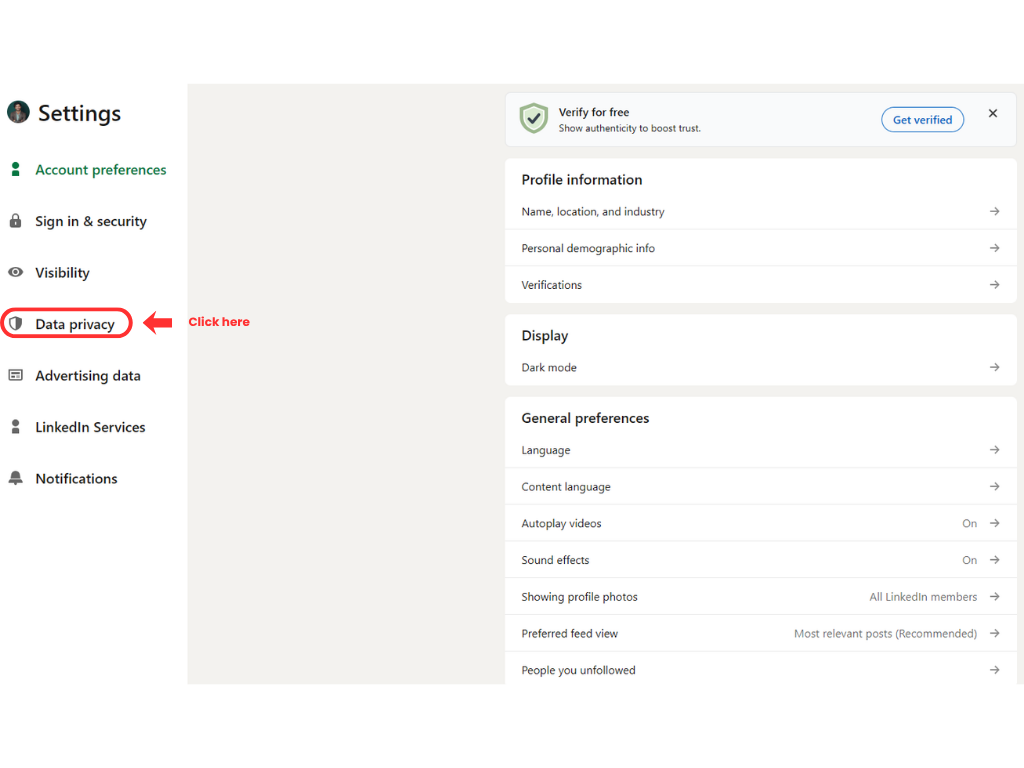
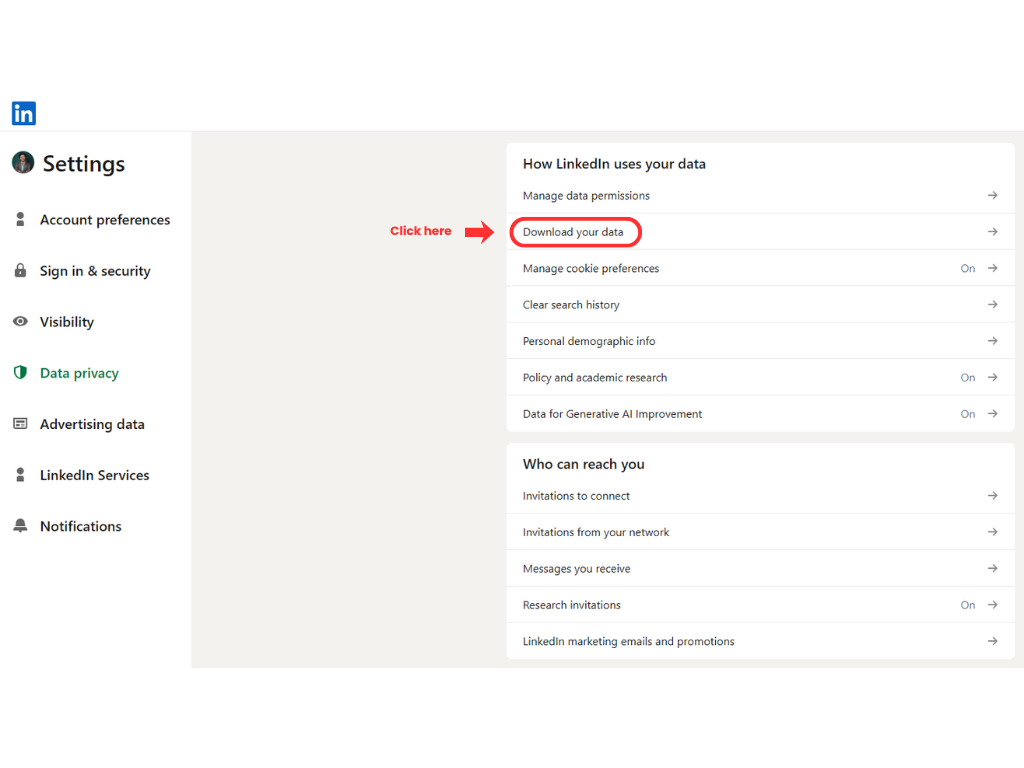
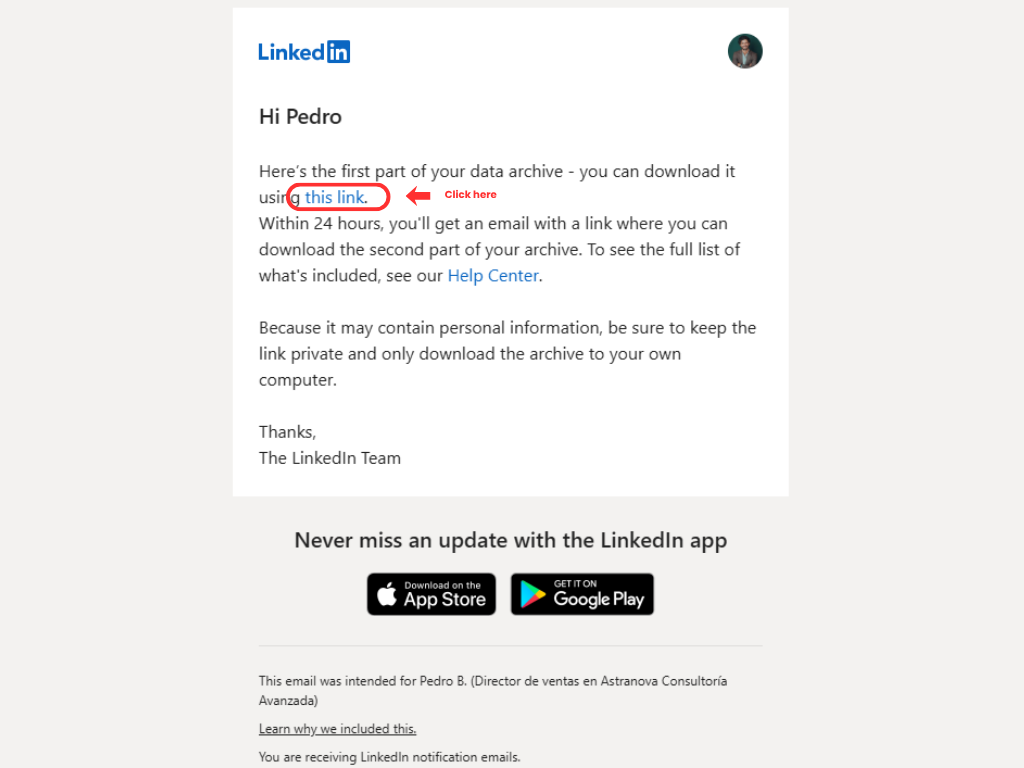
Request your LinkedIn data archive. LinkedIn sends Part 1 first and emails the download link for Part 2 within 24 hours.
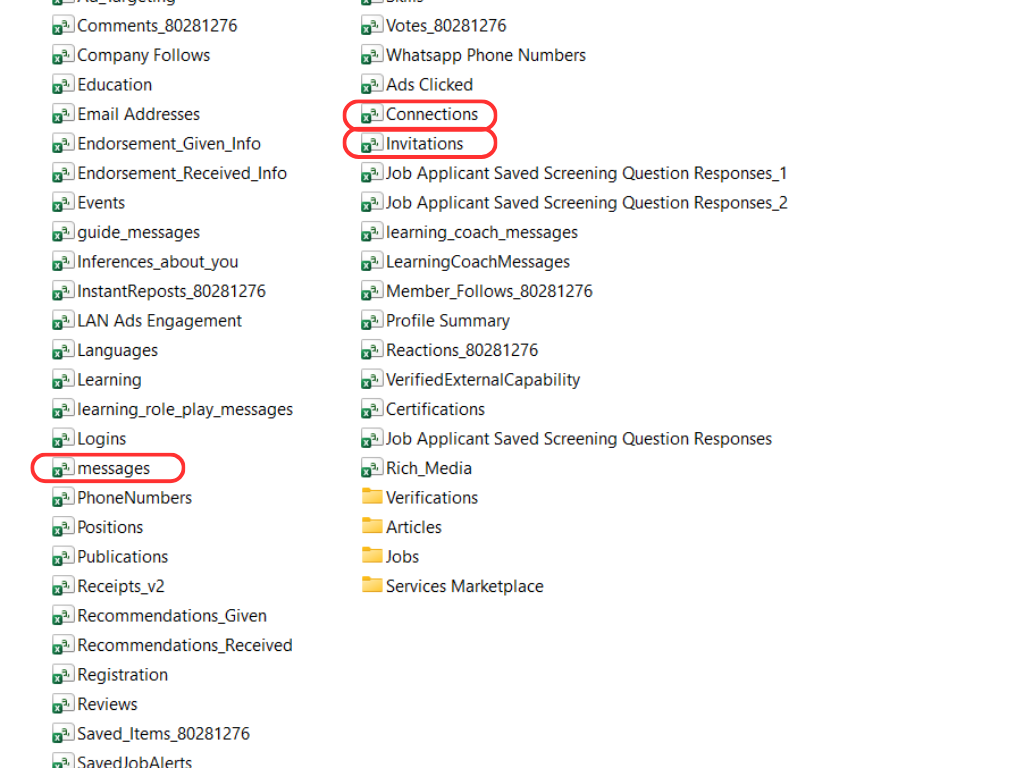
Download and extract both ZIP parts. Then select messages.csv and Connections.csv. Add Invitations.csv for richer context.
Review response patterns, outreach context and conversations worth reopening.
Conversation history, timestamps, senders, recipients, subjects and message text.
Connection dates, names, profile URLs, companies and positions used to add relationship context.
Outgoing invitations, invitation notes and matching signals that improve outreach classification.
Posts, reactions, profile data, ads and other unrelated files are not read by Pactando.
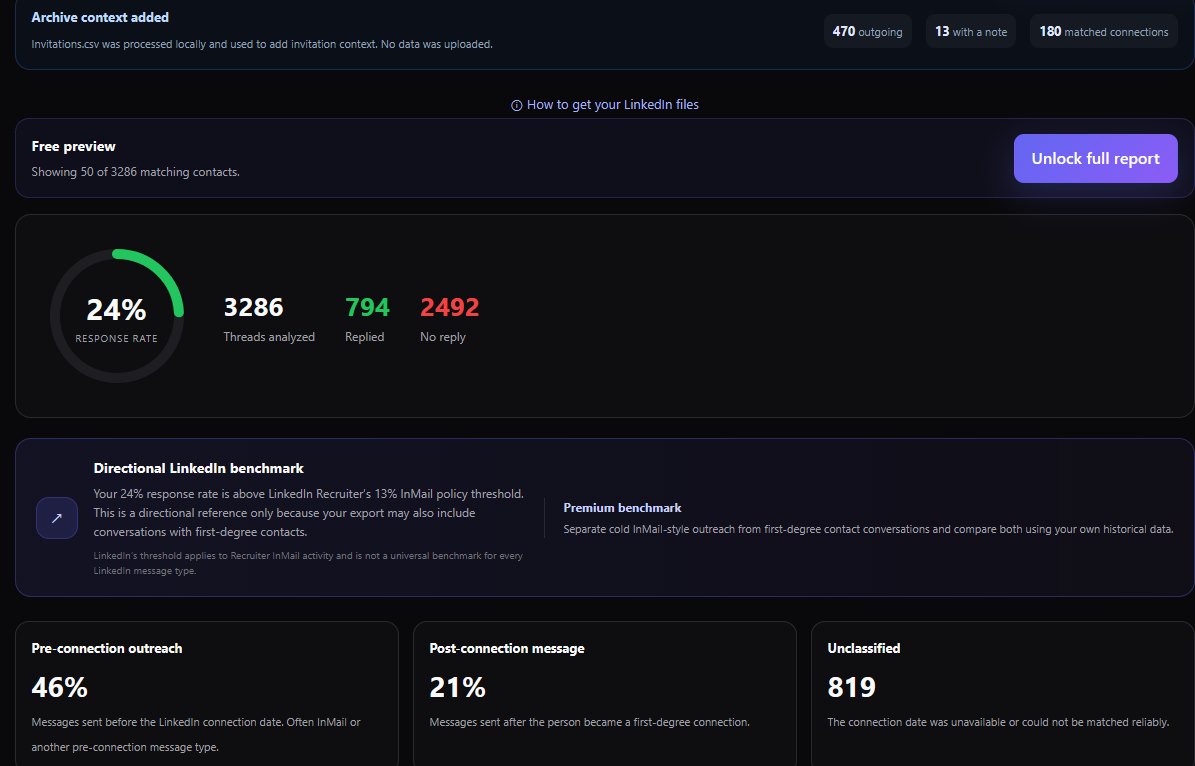
Move beyond a top-line response rate. Compare outreach context, understand invitation usage and recover conversations that may deserve a follow-up.
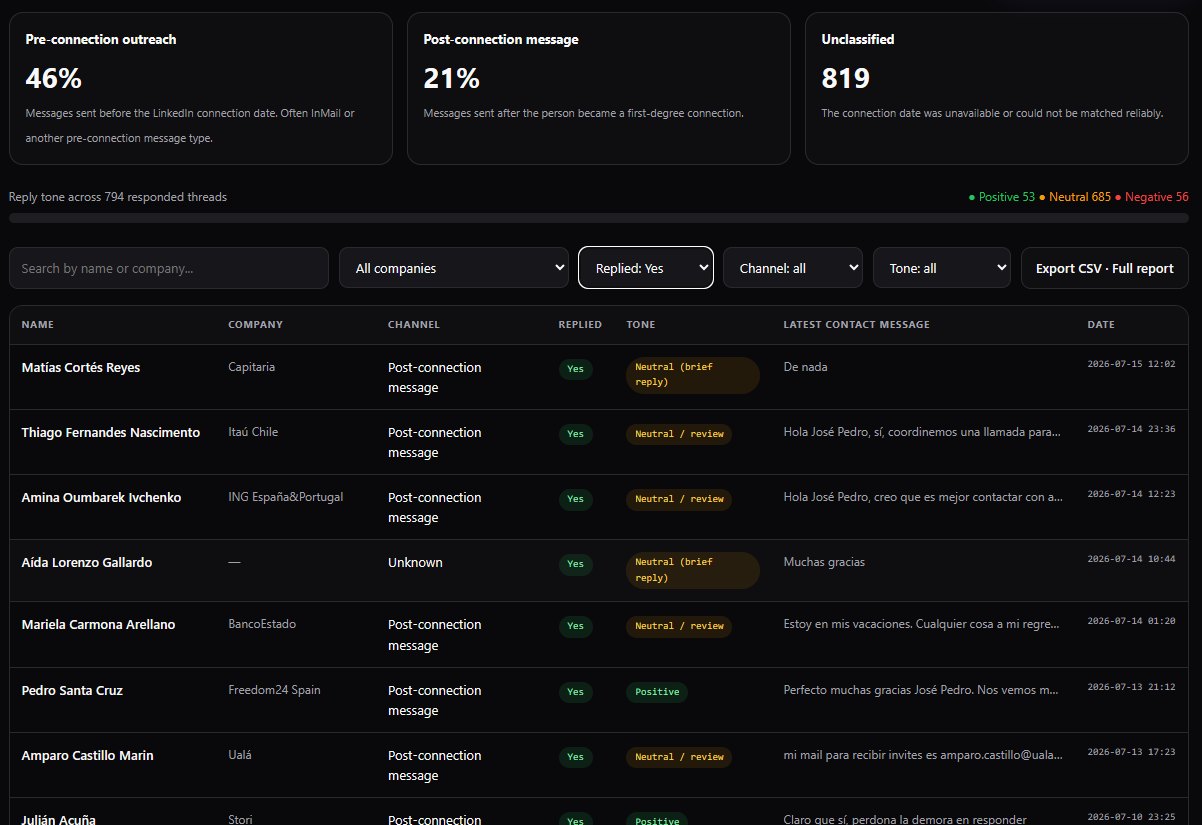
Move from a top-line metric to the individual conversations behind the result.
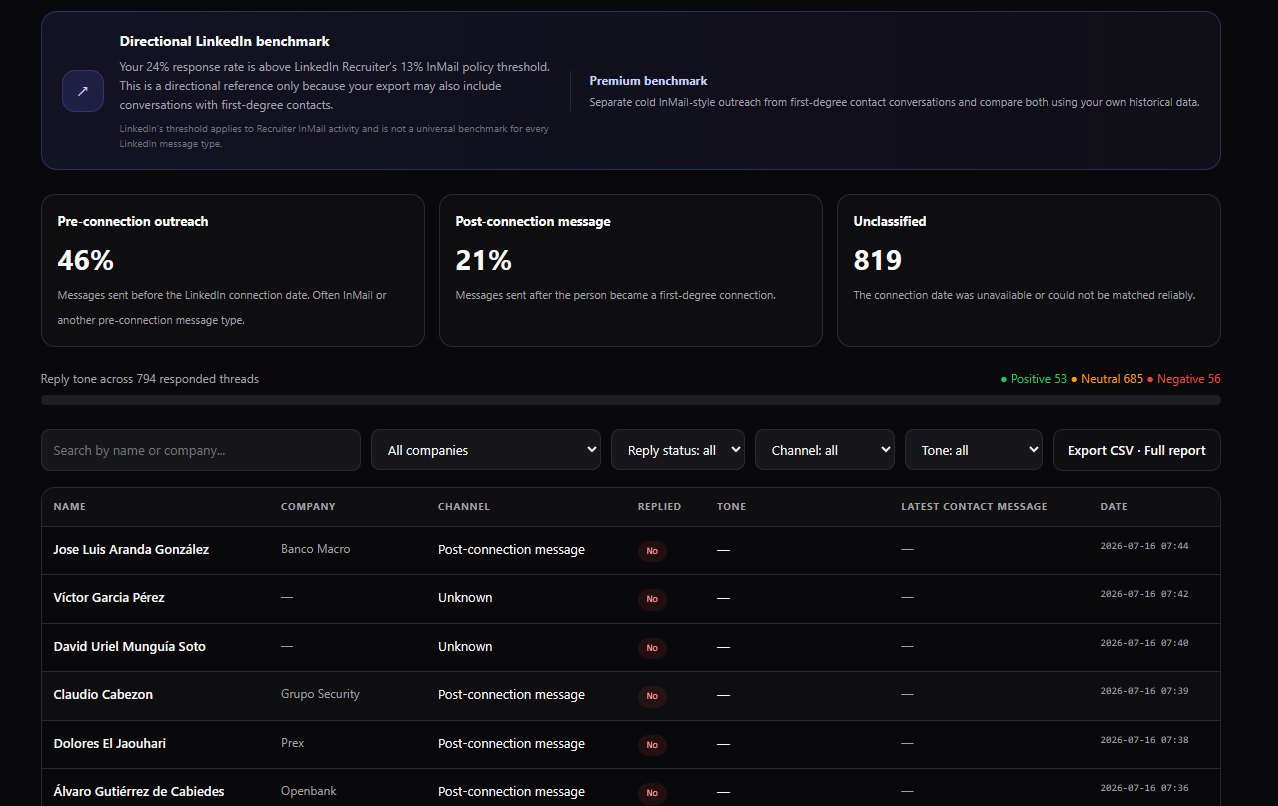
Review positive, neutral and negative reply signals without exporting data to a server.
Pactando is designed for professionals who research prospects, write personalized messages and treat every LinkedIn conversation as a relationship—not a number.
Learn from direct conversations with customers, partners and investors.
Review long-cycle conversations where timing and follow-up matter.
Improve relationship-based prospecting across clients and markets.
Find candidates who replied, requested details or need another touch.
Understand engagement across companies, channels and partnership conversations.
Refine thoughtful outreach where each opportunity has meaningful value.
Free analysis happens locally in your browser. Pactando does not need your LinkedIn login and does not store your CSV files or raw conversations.
Read the Privacy Notice →Your credentials are never requested.
The Free analyzer runs inside your browser.
Your CSV files and raw messages are not stored.
It does not send messages, scrape profiles, create sequences or automate LinkedIn activity. It helps you improve the thoughtful outreach you already conduct.
Pactando is for people who believe every conversation matters.
The Free Analyzer shows what happened. Deep Analysis helps you decide what to do next. No mandatory subscription or stored conversation history.
Understand what happened across your LinkedIn outreach without creating an account.
Understand why conversations performed and receive a prioritized plan for what to do next.
For professionals who need repeated analyses across projects, clients or markets.
Pactando processes your selected LinkedIn export files locally inside the browser. The analyzer does not need your LinkedIn credentials or a server-side message database.
Extract both LinkedIn archive parts, then select messages.csv and Connections.csv. Invitations.csv is optional. Once both required files are validated, click Run free analysis. Loading a file never starts the analysis automatically.
Pactando uses two required files from LinkedIn’s larger archive — messages.csv and Connections.csv — plus Invitations.csv as optional context. The rest of the archive is ignored.
Load fictional sample data to explore the dashboard without using your own export.
Free beta: overall metrics plus the 50 most recent contacts. Full results and export will be part of the paid report.
Select Download larger data archive so LinkedIn includes the files Pactando needs.
LinkedIn may deliver the archive in more than one email or ZIP file. Download and extract every part,
then return with messages.csv and Connections.csv.
Invitations.csv is optional.
Click any image to enlarge it. messages and Connections are required; Invitations is optional.
Request the official LinkedIn data export first. Pactando does not connect to your account, so the analyzer starts once you have the CSV files.
Can’t find messages.csv or Connections.csv?
Make sure you requested LinkedIn’s larger data archive and extracted every ZIP part.
Use the CSV files found across the two LinkedIn archive parts. messages.csv and Connections.csv are required. Invitations.csv is optional and adds invitation context. Everything remains local in Free.
Continue below and load the required CSV files directly in your browser.
Open the step-by-step guide and request LinkedIn’s larger data archive.
LinkedIn may take several hours. Save your progress and return when the email arrives.
Pactando saved this status only in this browser. When the archive arrives, return here and load the required files.
Load the two required CSV files. Pactando validates them locally before enabling the analysis.
Your response rate will be compared with LinkedIn Recruiter’s 13% InMail policy threshold. This is a directional reference only because your export may also include conversations with first-degree contacts.
LinkedIn’s threshold applies to Recruiter InMail activity and is not a universal benchmark for every LinkedIn message type.| Name | Company | Channel | Replied | Commercial intent | Latest contact turn | Date |
|---|
Deep Analysis adds intent classification, opportunity scoring, missed follow-ups, message coaching and a downloadable advanced report.
No. It works with the data export you request directly from LinkedIn.
No. The analyzer never requests LinkedIn credentials.
In this standalone version, the selected CSV files are read and processed by JavaScript in your browser.
Yes, when company information is available in the exported connection data and can be matched to the conversation.
No. Results reflect the files contained in the export you upload.
No. It is an analytics tool and does not send messages or automate LinkedIn activity.
Turn your official LinkedIn message history into a clear, filterable follow-up view.
Analyze my outreach →One advanced analysis of your current LinkedIn export. No subscription and no stored conversation history.